Friday, July 17, 2009

How to install latest Red5 on Linux

Instructions to install latest Red5 and JDK on Linux VPS or Dedicated Server:
Red5 Linux Installation Tutorial

An alternative to doing the red5 installation yourself would be to order red5 installation .

If you don’t have the time and experience to run your own server or vps, you should use managed red5 hosting .

Saturday, June 06, 2009

Red5 v0.8 RC3 on Linux and VideoFlashChat

First, read this step by step tutorial for installing latest Java and Red5 on Linux.

After installing the videoflashchat webapps, restart the Red5 server.

Also try removing these from WEB-INF/web.xml if present, as latest Red5 has different logging classes:

<context-param>

<param-name>log4jConfigLocation</param-name>

<param-value>/WEB-INF/log4j.properties</param-value>

</context-param>


<listener>

<listener-class>org.springframework.web.context.ContextLoaderListener</listener-class>

</listener>

Tuesday, March 24, 2009

RTMP Installation Tutorials for Video Flash Chat

Here are some samples of installing the videoflashchat rtmp application on different systems with default settings.


Installing in Red5 on Red Hat

1. Copy _setup/_red5/videoflashchat to opt/red5/dist/videoflashchat and restart the red5 server.

If you install it in a different folder name, edit videoflashchat/WEB-INF/red5-web.properties to reflect that.

2. Restart red5 .
sh /opt/red5/dis/red5-shutdown.sh
sh /opt/red5/dis/red5.sh


Installing in FMS with Influxis
1. From My Applications create application with Add New Application. Use any name i.e. "videoflashchat" and save generated rtmp path.
2. From File Admin edit videoflashchat/main.asc file and make sure it has the contents of _setup/_fms/videoflashchat/main.asc (open it with notepad or other text editor). If needed select all from text editor (CTRL+A), copy (CTRL+C), move to form, select all from there (CTRL+A), paste from clipboard (CTRL+V) to overwrite.
3. From Permissions, Set Referring Domain(s), Add New Domain - add your domain that hosts the flash (i.e. your-domain.com)


Installing in FMS on Windows

Copy _setup/_fms/videoflashchat to C:\Program Files\Adobe\Flash Media Sever X.X\applications.


Note: This requires the Flash Media Interactive Server, as it also needs other features in addition to streaming.


Installing in Red5 on Windows

1. Copy _setup/_red5/videoflashchat to C:\Program Files\Red5\webapps.

If you install it in a different folder name, edit videoflashchat/WEB-INF/red5-web.properties to reflect that.

2. Run... services.msc (or go there from Control Panel > Administrative Tools > Services , find & right click Red5 row and choose Restart.


If you allow videoflahschat.com or any domain to access your rtmp server you can test the rtmp installation with this: http://www.videoflashchat.com/videoflashchat/connectiontest.html


If you don't find a solution check our managed hosting plans for FMS & Red5:

Shared FMS RTMP Plans:


6GB 15GB 75GB
Maximum simultaneous connections*
max. 100
Maximum streaming bandwidth* max. 1.5mb/s
Monthly Bandwidth Allowance ** 6Gb 15Gb 75GB
Video Storage Space 90Mb 300Mb 1.5Gb
Monthly Fee $19.95 33$ 75$


Premium video streaming hosting plans include:
+ Unlimited RTMP hosting on Red5. That means streaming can use as much bandwidth as available per plan and there are no limitations for the number of simultaneous connections (other that server load).
+ 1 Dedicated IP
+ 1 Free Installation
+ Video Sharing capable (FFMpeg Hosting)
+ CPanel
+ Fantastico (free scripts like wordpress, joomla and other tools easy to install)

Premium Hosting Plans Premium 1 Premium 2 Premium 3
Space 10 000 Mb 15 000 Mb 30 000 Mb
Bandwidth 200 Gb 300 Gb 600 Gb
Monthly Price $50 $60 $75


Contact us for details and order links.

Sunday, January 04, 2009

Pay Per View Video Chat Software Improvements

Upgrades

Important upgrades and improvements are available for Video Girls BiZ PPV Video Chat Software
  • New FREE dark red template
  • Performer ID verification
  • User video recordings on profile page
  • Live video streaming on profile page and video chat page
  • Spy webcam feature for administrators
  • Forum
Promotions
+ 1 Year license for just $299
+ Purchase License and get 4 months free startup hosting (web & fms).
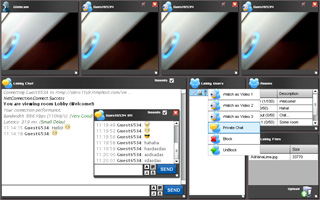
More Video Demos


Tuesday, December 09, 2008

VideoWhisper.com Video Chat Software


New AS3 Flash Video Chat software is beeing developed by VideoWhisper.com . Currently a video conference solution is available for testing.

This requires at least Flash 9 but AS3 is advertised to be more stable and a lot faster compared to older AS2. Users with Flash8 and older can't use AS3.

Wednesday, August 06, 2008

Demo Movies, Whisper Mode, Spy Webcams

Demo movies added to the video chat demos page:


New Features
# Spy Webcams for all active sessions (requires Live Video for Visitors Plugin)
# Whisper (send message only to selected user)
# Whisper Mode support (only whispers allowed, great for private discussions on dating websites)

Wednesday, July 16, 2008

RTMP Connection test for VideoFlashChat

We created a VideoFlashChat RTMP connection checker using AS3 to check if everything is ok with the streaming server:
http://www.videoflashchat.com/videoflashchat/connectiontest.html

Test with rtmp://obrix1ty9.rtmphost.com/videoflashchat . Connections from other domains are rejected by our fms host so this path will only work with this one but you can test your own installations if the sever allows connections from videoflashchat.com .

Submit a ticket if you are a customer and need this zipped to test your installation.

Code:

import flash.net.NetConnection;
import flash.net.NetStream;
import flash.events.*;

// Current release of FMS only understands AMF0 so tell Flex to
// use AMF0 for all NetConnection objects.
NetConnection.defaultObjectEncoding = flash.net.ObjectEncoding.AMF0;

if (link.text.length==0) link.text="rtmp://videoflashchat";
bt_connect.addEventListener(MouseEvent.CLICK, try_connect);

function try_connect(e:MouseEvent)
{
var button:Button = e.target as Button;
log.appendText("\nConnecting to: "+link.text);
fmsconnect(link.text);
}

function fmsconnect(server)
{
var UserName="test_conn";
var sex="male";
var room="test";

//connection
var fmscon:NetConnection = new NetConnection();
fmscon.connect(server,UserName,sex,room);
fmscon.addEventListener(NetStatusEvent.NET_STATUS, netStatus);

function netStatus(event:NetStatusEvent):void {
var info:Object = event.info;
log.appendText("\n"+info.code);
}
}

Friday, June 20, 2008

Red5 v0.7.0 Final

We checked compatibility of Video Flash Chat with the new Red5 final version and updated as necessary.

Instructions for accessing the new Flex adminPanel (inspired from a mailing list post) after installing the new Red5 on your computer:
1. Start Red5 0.7.0 / Service in Windows (Start > Run...: services.msc )
2. Open: http://localhost:5080/admin/register.html
3. Fill your new user and password. Submit.
4. Restart Red5
5. Open: http://localhost:5080/demos/adminPanel.html
6. Fill "localhost" as server and the user/pass you defined in step 3. Submit.

This file required updating for the application to work with the latest version:
videoflashchat/WEB-INF/web.xml

Contact us if you are a customer and need an update.

Wednesday, February 13, 2008

Red5 Support

Red5 Free Open Source Server is now supported in addition to FCS1.5 & FMS2 for Video Flash Chat.

Red5 is a free, open source Flash server that supports streaming and recording audio/video, live stream publishing and Flash remoting. Its commercial brother is Adobe® Flash Media Server.Red5 is a free, open source, Java based, alternative to Adobe's Flash Media Server.

To install Red5 you need a dedicated server. You can not install Red5 on a shared hosting plan. Red5 is available for both Windows and Linux. You can find more info about it here: http://osflash.org/red5

VideoFlashChat software packages include both server side application versions: actionscript for FCS, FMS2 and java for Red5. You can switch anytime from one option to another.


All Video Flash Chat packages support Red5:

Video Girls - PPV VideoChat Software
http://www.videogirls.biz

Video Flash Chat - Web Based Video Chat
http://www.videoflashchat.com

Software for Dating w. VideoChat
http://www.software-dating.com

Monday, January 14, 2008

Upgrades: Views, Zoom, New Template

Important additions are ready for the Video Flash Chat software:
  • New buttons where added to switch between different views (with new layouts generated by the resize of the video panel) and to zoom the flash.
  • A new template is available with black background and thin white lines delimiting controls: Black Line template.
A special new page was added to the product presentation website: Investment Plans.
Plans: License Purchase, License Rental, included FMS2 streaming hosting. New special options can be ordered for the package: Flash Link Removal and Flash Custom Layout & Template.

Wednesday, December 12, 2007

Video Flash Chat v7.5 - Upgrade

We decided to use the same ateom / match agency / videoflashchat version number as all software packages are built on the same content management engine.

In addition to the stand alone version and plugin for Match Agency packages, Video Flash Chat is also available in a special pay per view video chat edition: Video Girls - Online Paid Videochat Business Software .


Version updates:
  • Video Flash Chat 7.5
    • User can view inchat details page for other users with profile picture, profile brief details, profile link, cost if performer
    • Easy integration files
    • Visitors plugin integration improved - join room if user is available in a public or personally hosted room or send offline invitation if user is not online

      VideoGirls BiZ - Videochat Software
  • Paid Video Chat module (available for the Video Girls BiZ product)
    • Webmaster pvc income statistics (daily, weekly, monthly - website income, performer income, member expenses)
    • Performer comissions setup by admin
    • Custom performer cost per minute editable from member area
    • Member income statistics
      Videochat performers have a special performer panel for their activities, settings and statistics.

Wednesday, November 01, 2006

Templates Support added to Video Flash Chat


As a highly requested feature we developed templates support for Video Flash Chat .

Each template is located on a different folder and holds interface graphics (.gif images) and color settings.

New templates can be easily created: Just edit the existing images or create new ones that match the sample sizes.

Multiple templates can be used on the same website.

Friday, September 22, 2006

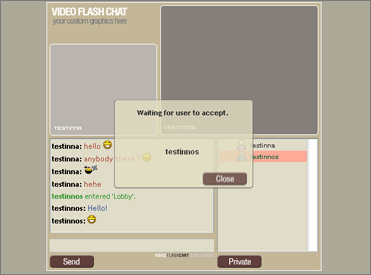
Video Flash Chat - Stand Alone Version, Private AV Chat

VideoFlashChat - is now available as stand stand alone package.

Video Flash Chat is the right software to provide AV presence to your website's users. It can be used on a wide range of websites (chat for dating, live support, adult video chat). This software is developed and supported by Datetopia.com , a leading provider in dating software industry since 2002. This experience guarantees high usability design, features and best performance, things you'll really need in a competitive market like this. The software supports 2 way realtime audio & video chat and fast private chat sessions - all 100% web based and monitored trough the webmaster area. Session monitoring and control, webmaster features are done trough regular server using php scripts and a mysql database to limit load and bandwidth comsumption on the FMS server. The webmaster interface is powered by the ATEOM - Webmaster Power Tools , the same engine that powers one of the best commercial matchmaking software available online: Match Agency . The integration into Match Agency packages includes the option to invite any user to a private video chat directly from the profile page (i.e see Match Agency BiZ ).

Versions Info

  • v1.5
    • Stand alone version available, including webmaster support powered by Ateom - Webmaster Power Tools
    • Private chat requests inside chat, dialog to accept/deny
    • Monitor private chats, disconnect
    • Monitor sessions, disconnect
  • v1.2
    • Multiple public rooms editable from webmaster area with custom access ranks
    • Custom FMS server can be set for each room (webmaster can provide better server to premium users or create server location rooms - i.e. US/Europe)
    • Private video chat rooms integration for Match Agency
    • Private chat invitations with instant notification (link available on each Match Agency profile)
    • Custom FMS server for private chat rooms
    • Custom chat text colors for unknown(default)/male/female
    • Custom session time limit
  • v1.0
    • Video Streaming Chat using FMS (Flash Media Server)

Thursday, September 21, 2006

Video Flash Chat Plugin for Match Agency BiZ

The VideoFlashChat application was created as module for Match Agency BiZ .
A stand alone version will also be available in the near future.
  • Video Streaming trough FMS (Flash Media Server)
  • Multiple rooms editable from webmaster area with custom access ranks
  • Custom FMS server can be set for each room (webmaster can provide better server to premium users or create server location rooms - i.e. US/Europe)
  • Private video chat rooms
  • Private chat invitations with instant notification (link available on each profile)
  • Custom FMS server for private chat rooms
  • Custom chat text colors for unknown(default)/male/female
  • Custom session time limit
More details about this release on the Datetopia Blog.