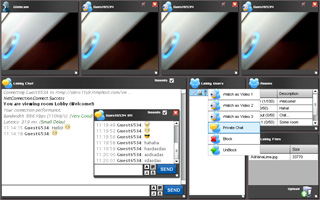
New AS3 Flash Video Chat software is beeing developed by VideoWhisper.com . Currently a video conference solution is available for testing.
This requires at least Flash 9 but AS3 is advertised to be more stable and a lot faster compared to older AS2. Users with Flash8 and older can't use AS3.
Video Flash Chat is the right software to provide 2 way AV presence to your site's users. It can be used on a wide range of websites (chat for dating, live support, adult video chat).
Showing posts with label as3. Show all posts
Tuesday, December 09, 2008
Wednesday, July 16, 2008
RTMP Connection test for VideoFlashChat
We created a VideoFlashChat RTMP connection checker using AS3 to check if everything is ok with the streaming server:
http://www.videoflashchat.com/videoflashchat/connectiontest.html
Test with rtmp://obrix1ty9.rtmphost.com/videoflashchat . Connections from other domains are rejected by our fms host so this path will only work with this one but you can test your own installations if the sever allows connections from videoflashchat.com .
Submit a ticket if you are a customer and need this zipped to test your installation.
Code:
import flash.net.NetConnection;
import flash.net.NetStream;
import flash.events.*;
// Current release of FMS only understands AMF0 so tell Flex to
// use AMF0 for all NetConnection objects.
NetConnection.defaultObjectEncoding = flash.net.ObjectEncoding.AMF0;
if (link.text.length==0) link.text="rtmp://videoflashchat";
bt_connect.addEventListener(MouseEvent.CLICK, try_connect);
function try_connect(e:MouseEvent)
{
var button:Button = e.target as Button;
log.appendText("\nConnecting to: "+link.text);
fmsconnect(link.text);
}
function fmsconnect(server)
{
var UserName="test_conn";
var sex="male";
var room="test";
//connection
var fmscon:NetConnection = new NetConnection();
fmscon.connect(server,UserName,sex,room);
fmscon.addEventListener(NetStatusEvent.NET_STATUS, netStatus);
function netStatus(event:NetStatusEvent):void {
var info:Object = event.info;
log.appendText("\n"+info.code);
}
}
http://www.videoflashchat.com/videoflashchat/connectiontest.html
Test with rtmp://obrix1ty9.rtmphost.com/videoflashchat . Connections from other domains are rejected by our fms host so this path will only work with this one but you can test your own installations if the sever allows connections from videoflashchat.com .
Submit a ticket if you are a customer and need this zipped to test your installation.
Code:
import flash.net.NetConnection;
import flash.net.NetStream;
import flash.events.*;
// Current release of FMS only understands AMF0 so tell Flex to
// use AMF0 for all NetConnection objects.
NetConnection.defaultObjectEncoding = flash.net.ObjectEncoding.AMF0;
if (link.text.length==0) link.text="rtmp://videoflashchat";
bt_connect.addEventListener(MouseEvent.CLICK, try_connect);
function try_connect(e:MouseEvent)
{
var button:Button = e.target as Button;
log.appendText("\nConnecting to: "+link.text);
fmsconnect(link.text);
}
function fmsconnect(server)
{
var UserName="test_conn";
var sex="male";
var room="test";
//connection
var fmscon:NetConnection = new NetConnection();
fmscon.connect(server,UserName,sex,room);
fmscon.addEventListener(NetStatusEvent.NET_STATUS, netStatus);
function netStatus(event:NetStatusEvent):void {
var info:Object = event.info;
log.appendText("\n"+info.code);
}
}
Labels:
actionscript,
as3,
check,
connection,
fms,
red5,
rmtp,
test,
wowza
Subscribe to:
Posts (Atom)